According to a report from Bloomberg, Google is working on a new paid music subscription service to compete with rivals like Apple and Spotify The search-giant is planning to launch the service by March 2018. The new music subscription service is internally referred as Remix, and is said to be different from other two rivals. Google is planning to bring on-demand streaming along with incorporating elements such as video clips from YouTube. It has also reached out to artists to seek their help promoting the new service. The report further mentions that YouTube has already signed a deal with Warner Music Group one of world’s three major record labels, while talks are underway with Sony Music Entertainment and Universal Music Group. This will be Google's third attempt to compete with other music streaming services. In 2011, Google introduced Play Music, followed by YouTube Music Key in 2014, giving subscribers add-free music video. Then in 2016 it released YouTube Red, enabling users to watch any video without advertising. However, Google did not have the same success as Apple or Spotify in convincing people to sign for its paid services. Having said that, paid services from Spotify and Apple Music are growing again after almost two decades of decline. So it appears that, YouTube is giving this market another try.
YouTube has come out with a Instagram and Snapchat's Stories like feature for the Creators, which it is calling 'Reels'. This way creators will be able to easily express themselves and engage with fans. For the unaware, the Stories feature allows users to create a feed of photos and videos for sharing with friends and expires after 24 hours. However, unlike Stories, YouTube's Reels function will not expire after 24 hours. They will live forever under a separate tab from the regular YouTube contents made by users.
Creators will be able to shoot multiple Reels, and each Reel will last up to 30 seconds in lengths. They can also customize Reels by adding filters, text, stickers and links. Much like YouTube videos, viewers can rate 'Reels' by giving them a thumbs up or thumbs down, as well as post comments. Reels is currently rolling out to YouTube Creators who have more than 10,000 YouTube subscribers. However, the feature is in beta phase, so that YouTube can improve the feature and expand to more creators. Source | Via
Google has finally released the stable version of YouTube Go, an app designed for low-end smartphones and slow internet connection. To remind you, the app was announced late last year, and was released in beta form back in April this year. But now the official YouTube Go app has shed its beta tag and is available for download from the Play Store in select regions including Algeria, Egypt, Ghana, India, Indonesia, Jordan and Kenya among others. In case, you aren't in these regions, you can download the app from third party website like APKMirror and manually install it on you phone. YouTube Go is a streamlined version of YouTube, and was designed from the ground up to be offline first and work on handsets featuring entry-level specs. The app's size is as low as 8.94MB and is compatible with any devices running Android 4.1 Jelly Bean and future versions. The app offers features like offline video viewing and sharing, video recommendations and gives you control over mobile data consumption. It lets you stream YouTube videos seamlessly across various connectivity situations. You can also download the video to your phone's storage/microSD card for offline viewing and before downloading you can even preview the video first, and then choose the video's file size/resolution for saving. You can also share the offline saved videos with your friends and family as well without using any data. For this the app creates a Wi-Fi connectivity between devices (same as ShareIt) to ensure fast and seamless transfer of videos, without requiring any data. The YouTube Go app can be downloaded from here (Link) Via
Smartphones with bigger and wider display featuring 18:9 aspect ratio are on the rise, thanks to use of bezel-less design in most of the handsets including mid-rangers. They offer immersive media viewing experience, but watching YouTube has not been pleasing as most of the videos are optimized for the 16:9 aspect ratio. This means when you watch YouTube on a 18:9 display in full screen mode, black bars will appear on each side of the display. Having said that, YouTube has updated its Android and iOS app (v.12.44) to add 18:9 display support with a new 'pinch-to-zoom' gesture function. This feature will let you expand the video to fit into the entire display. So now users with devices like LG G6, LG V30, Samsung Galaxy S8/S8+, Galaxy Note8, Pixel 2XL, Micromax Canvas Infinity, Xiaomi Mi MIX 2, vivo V7+, OnePlus 5T and iPhone X can just pinch the YouTube video with two fingers, and it will zoom out to fit the entire display, hence, eliminating the black bars. The new feature is being rolled out to YouTube app for Android devices through the Google Play Store and for the iPhone X through App Store.
Google launched a new YouTube app designed for kids called YouTube kids in 2015, and one year later in November 2016, released the app in India. Now to celebrate the one year anniversary of YouTube Kids in the country, Google has rolled out an update to the app, bringing refreshed looks, kids profiles, more parental controls, and more. The updated version of YouTube Kids app gives parent full control of their kid's screen time, and the content they watch. It also provides kids a more personalized experience with the ability to create their own profile, and enjoy content which is linked to their profile in case of shared devices. Parents can create profile for each of their kids and choose between younger and older content level to manage the type of videos they watch. When you enter a date on the kid profile, YouTube Kids changes the way the apps look. For instance, younger kids will get less text, while older kids will get more content on their home screen.
Kid profiles will work across all different device. Additionally the new setup process will give parents detailed information about the type of content, to help them make the right choice before your kids use the app. Kids can also set a secret passcode to access their profile, and keep their siblings out. However, parents have the option to override the passcode. YouTube Kids app also includes a tutorial for parents that explains upfront how the app's system choose and recommend content, and how to flag inappropriate videos. Google in the YouTube blog post stated that "our systems work hard to filter out more mature content from the app. But no system is perfect. As our video inventory grows, we will continue to rely on you and our parent community to provide feedback, since there’s always a chance a child might find an inappropriate video in the app. If you find a video that you think should not be in the app, you can block it and flag it for review. This helps make YouTube Kids better for everyone." Google claims that YouTube Kid's app gets a total 800 million learning video views per day. It also says, the app is now live in 37 countries, has more than 70 billion views and more than 11 million weekly active viewers. Source
YouTube entered into the entertainment live streaming segment back in March with the launch of YouTube TV, that gives users access to live contents from more than 40 networks at $35 per month. However it was available only for smartphone, tablets and PC. And to watch the contents on TV, users has to use Chromecast to stream content from their device to the TV, as there was no native YouTube TV app. But that's changing now. Google has launched YouTube TV app for the smart TV platforms. In the next few days, users will be able to stream live TV through YouTube TV app on Android TV devices, including NVIDIA Shield and TVs with Android TV build-in such as Sony. It will also be available on the Xbox One family as well (Xbox One, Xbox One S and soon Xbox One X). In the coming weeks, Android TV app availability will expand to Smart TVs from Samsung, Sony, and Apple TV. YouTube TV app for Smart TVs works the same as the mobile platform, but the interface is designed for bigger screens. The app's background is more dark for a more cinematic look, and you can control YouTube TV app with your TV's remote control or game controller. There's support for background playback and also a new Live guide, that gives you a sneak-peek at what's airing soon. Lastly, the app allows you to pause a video on one device, and continue where you left off on another. YouTube TV is now available in all top 50 metro areas, covering over two-thirds of the U.S. Source | Via
Google added HDR (High Dynamic Range) video support for YouTube in November last year. The addition allowed users to watch YouTube videos in HDR on supported TVs. Now it is rolling out support for HDR videos to the YouTube's Android mobile app. The devices that support YouTube Mobile HDR include Google's Pixel, Pixel 2, LG's V30, Samsung's Galaxy S8/S8+ and Note 8, and Sony's Xperia XZ Premium. The feature will support HDR playback at up to 1440p (2K) resolution and 60fps. However, users are facing problems while playing HDR contents on their mobile devices like stuttering video, no full screen mode options, no option to return back to previous resolutions, and brightness set to maximum in landscape mode resulting in battery life drain. Meanwhile, Google said that it will work with other smartphone makers to bring HDR playback support to more devices. Popular online-streaming service has already enabled HDR support on select flagship devices like LG G6, LG V30, Samsung Galaxy Note 8, Sony Xperia XZ1 and Sony Xperia XZ Premium. With
support for HDR, videos offer better picture quality with higher
contrast to deliver precise, detailed shadows and stunning image quality
with more clarity. According to Google "HDR unlocks the most spectacular image quality we've ever streamed". Source | Via
YouTube has rolled out significant design changes for its mobile and desktop app. In addition for the first time in 12 years, the YouTube icon and logo has also been changed. Now the play icon is placed next to the YouTube logo for a cleaner look. Previously, the Tube part was inside the red play button.
Moving on, the YouTube Mobile app is getting a bunch of changes and new features.
A new clean design, that makes the header white to focus on the content, and the navigation tabs have been moved to the bottom of app, so they're closer to your thumbs. There's also a new Library and Account tabs that gives you easy access what you're looking for.
Gestures that allows you to double tap on the left or right side of a video to fast forward or rewind 10 seconds. In the coming months YouTube is also testing a feature that will let you jump between videos with a simple swipe of your hand: just swipe left to watch previous video or swipe right for the next.
Now you can speed up and slow down the playback of a video on mobile app. This feature is already available on the YouTube's desktop platform.
YouTube player will change shape to match the video formats, such as vertical, square or horizontal automatically for the best viewing experience, with no black bars on the sides.
Browse video as you watch with a new suggested video row.
Along with mobile app, YouTube has also revamped its desktop design. The new material design of YouTube will deliver a fresh, simple and intuitive user experience. It also gets a new Dark Theme, which turns the background dark, while your watch for a more cinematic look. All these changes are being rolled out to YouTube users starting today on Desktop, Android, and iOS.
After being in test for over an year, YouTube is finally getting its in-app messaging feature. It had a soft launch in Canada earlier this year, and is now rolling out globally to all users. With the messaging feature you can share your favorite videos with your friends and family directly within the app, instead of copy-and-paste the video link and then sharing on other chat apps. Users can also reply to the videos using text, links to other video and emojis. Apart from sharing video, you can even chat with your friends, invite others to the conversation or create your own groups (up to 30 participants), just like WhatsApp and Facebook Messenger. The purpose of the new messaging feature is to keep discussion of videos within the YouTube platform to increase user engagement , rather than sharing in sites like Twitter and Facebook. The messaging feature can be found on a brand new tab called "Shared" (near Home, Trending, Subscriptions and Library tabs) in the YouTube mobile app. You can select the friends you want to share the videos from the phone’s contacts. Currently the feature is only available for YouTube mobile app, and not for the desktop version.
Google is rolling out a major update for YouTube app that brings refreshed UI and a new bottom navigation bar, so that it will be easier to navigate. The navigation bar on the bottom shows Home, Trending, Subscriptions, and Library tabs. The new layout was already available on iOS, and was being tested on Android, but is now available for all. Here's the full list of changes
Navigation tabs are clearly labeled. It’s also easier to reach the tabs with your thumb as they’re now along the bottom.
“Account” and “Library” have been separated to make it simpler to find what you’re looking for. Your videos (e.g. playlists, watch history, uploads) are in “Library,” while your Account and Settings are located from the profile icon at the top.
The navigation bars are visible on all pages (except for Watch), so you can quickly navigate to one of the main navigation tabs.
The app remembers where you left off on each tab. For example, if you scroll down through the Home feed, then go to your Subscriptions tab, and then return to Home, you can easily pick up where you left off.
As mentioned earlier, the update is already out for Android devices, and if you've not yet received it, it'll eventually be available soon. Source
After months of testing and refinement, YouTube has officially released the beta version of YouTube Go app for Android devices in India. It was first announced back in September and later an early beta release of the app was available for download. But now you can get YouTube Go officially from the PlayStore and try it out. The YouTube Go app is a streamlined version of YouTube, and was designed from the ground up to be offline first. The app is aimed at users who have slow internet connection and for those who are concerned about their data usage. It offers features like offline video viewing and sharing, video recommendations and gives you control over mobile data consumption. The app lets you stream YouTube videos seamless across various connectivity situations. You can also download the video for offline viewing. Before downloading you can even preview the video first, and then choose the video's file size/resolution for saving. You can also share the offline saved videos with your friends and family as well without using any data. For this the app creates a Wi-Fi connectivity between devices (same as ShareIt) to ensure fast and seamless transfer of videos, without requiring any data. Key features of YouTube Go include:
A home built for you: YouTube Go home screen features trending and popular videos in your area, so that you can find and discover videos that you and your community care about.
Preview videos before you save or watch: On YouTube Go we’ll show you a preview of the video when you tap on a thumbnail, giving you a better sense of what the video is about before you decide if you want to watch it.
Choose your resolution when saving or streaming videos: You can choose to save a video for offline viewing later or stream it now. And we also allow you to choose the amount of data you’d like to spend on that video.
Share videos with friends nearby: Share videos with friends and family nearby without using any data. You can send and receive videos instantly and offline with others using the YouTube Go app.
Google is finally foraying into the entertainment streaming segment to take on cable TV, with its new live streaming service called YouTube TV. The new service will let you watch popular channels live over the internet. Youtube TV membership will cost $35 per month, and will give you access to more than 40 networks. Some of the networks include ABC, CBS, NBC, FOX, USA, FX, FreeForm, Disney, ESPN, Fox Sports 1, NBC Sports Network, MSNBC, CNBC, Fox News, National Geographic and Fox Business. YouTube TV subscribers can also get access to YouTube Red Original series as well as movies. The YouTube streaming service will be in a form of standalone app, and will be available for Android and iOS devices. The app will let you watch content on your smartphone or tablet, and event stream to your TV with Google Chromecast. There's also a cloud DVR with no storage limits, that lets you record your favorite shows and save them for later viewing. The recordings will be stored on the cloud for nine months. One YouTube TV membership can be linked with six accounts, and each has its own unique recommendation and personal DVR as well. Google says that YouTube TV will be available soon in the U.S, and expand to other countries later. The app isn't live yet, but you can visit tv.youtube.com and sign up to be notified when it will be available.
Google is finally launching it's latest YouTube app called YouTube Go for Android devices, but it's a beta release. The app was announced back in September 2016, and is designed to work in countries like India, where internet connection is slow or patchy. The main highlight of YouTube Go is that, you can preview, watch, and share video without Internet connectivity. However, you will need internet connectivity to download the video for offline viewing. Once you download the app, you will have to fill up your details like Google email id and mobile number to register the app. YouTube Go is much like YouTube app, but when you select a video, it gives you the option to either stream it or save it offline. Before downloading the video, you will also get a preview of it. You can save a video offline to the phone's storage or SD Card in two resolutions ― basic quality and standard quality ― and play them later without the need of Internet connection. You can even share the saved offline videos with your friends via Bluetooth, but, you will need to access the internet to perform quick 15kb security check. The YouTube Go Beta is now available for download - Play Store | APK. Google says that since the app is in beta you might encounter bugs. Via
Ahead of Children's Day (celebrated on November 14), Google has rolled
out YouTube Kids app in India. After a year and a half since its launch, the app is now available on India's Google Play and
Apple App store. YouTube Kids has been designed
keeping children and parents in mind. The app offers child friendly
contents and makes exploring videos easier for kids with larger images,
bold icons and voice search functionality. It also has parental control
features to allow parents to restrict usage by children. The
home screen of YouTube Kids have buttons for Music, Shows, Learning,
Explore and Search for browsing channels and playlists. The
app also has parental control features like search settings, timers and
passcode to allow parents restrict usage of the app for kids. The contents are
offered in English and Hindi including contents from ChuChu TV and Kids TV. It also features the latest season of "Cat & Keet" by Toonz Animation, the Gummy Bear song in Hindi, and a new season of Appu - The Yogic Elephant among others. Lastly, the contents of YouTube Kids app can also be watched on big screen using Chromecast, Apple TV, games consoles or a smart TV. In the coming weeks, YouTube will add new guest selected playlists from educators, celebrities, trusted names and parents. Source
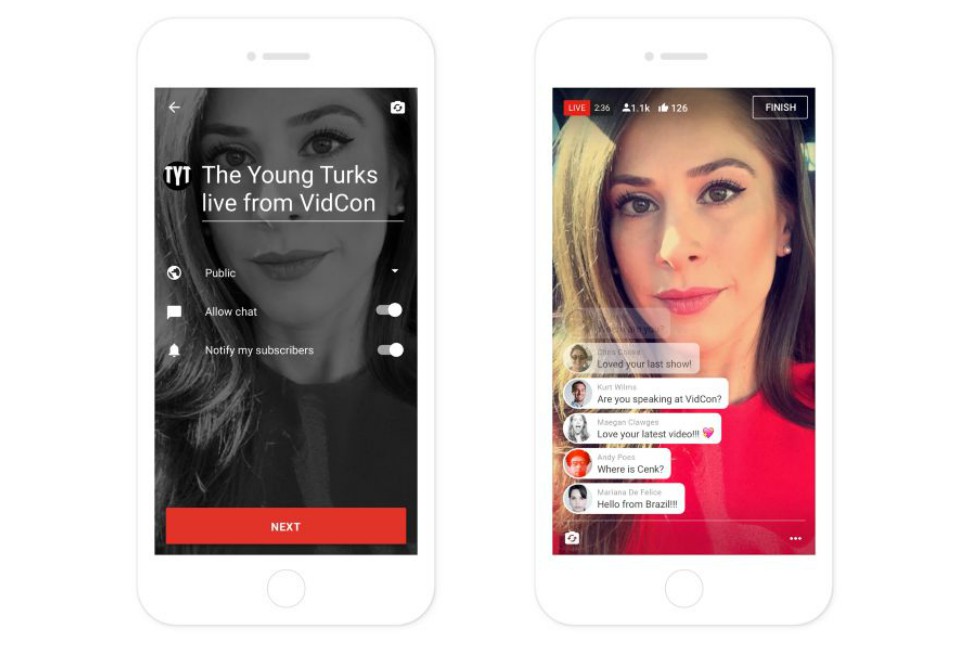
YouTube has announced that its live streaming feature is coming to mobile, allowing you to broadcast live video straight from your smartphone. The company says that that YouTube mobile live steaming will be baked right into the core of the YouTube mobile app for Android and iOS. To start a live video, users will have to tap on the red capture button, select a photo as thumbnail and broadcast live to followers. Users will also be able to search for live broadcasts, which can be found on playlists and recommendations. Near-real time chat will also be there. The new feature is currently available to select creators including The Young Turks, AIB, Platica Polinesia, SacconeJolys, and Alex Wassabi at VidCon, but will be rolling out to more users soon. The introduction of the feature is a way to counter Facebook's aggressive push of live videos on its platform. Other competitor will be Periscope, which is owned by Twitter. Even with this competition, YouTube says that its mobile app live streaming feature will "be faster and more reliable than anything else out there." Via
YouTube has announced a new Smart Offline feature for mobile devices in India, that lets you schedules offline video downloads. The new feature lets you take advantage of reduced data rates offered by telecom operators for night hours. Initially, the new feature will be rolling out to Airtel and Telenor
subscribers, and will expand to other carriers in the coming weeks. With the new feature, when you tap on the download button to view the video offline, you will get the option to select "Save overnight" function using the mobile operator's discounted night data
plan. Enabling the aforementioned option, YouTube will automatically scheduled your video to be downloaded after peak hours at night. The selected videos will be download overnight and will be available to watch on-the-go offline seamlessly without any buffering the next day. Note that the Smart Offline feature will not work on WiFi networks, and you will have to be connected over cellular networks (mobile data). To get the new feature you need to update the YouTube app to the latest version on your device.
YouTube has announced that it is working on a standalone virtual reality app for Google's virtual reality platform Daydream. Once the app is ready, it will be tweaked to work better inside the VR headset. The YouTube VR app will come with features such as voice search, discovery, playlists and more. It will also offer an immersive interface for searching and browsing. It will also be capable to play 16 x 9 videos, 360-degree footage and can also enjoy VR experience in full 3D as well. For providing contents on the VR app, YouTube is collaborating with NBA, BuzzFeed and Tastemed. YouTube is also working with camera partners to make Jump-ready camera such as GoPro Odyssey to help make the production of VR video more accessible. YouTube is already offering VR contents on its app and website including 360 degree videos, and has also added Google's Cardboard VR headset support for all videos.The standalone app will take YouTube's VR offering to the next level. Source
In November last year, Google added Google Cardboard support for all videos for YouTube's Android app. Now, Google has rolled out the same feature to YouTube's iOS app as well. iPhone users can now watch any 2D video and 360-degree video in Virtual reality using Google's Carboard VR headset. YouTube for iOS now shows a dedicated Cardboard button on the top right a video, and when you tap the button, you will be able to watch any videos in VR mode. You can check out VR videos such as Hunger Games Experience or TMOS Shoes Giving Trip and more. To access this feature, you will need the YouTube version 11.8 on your iOS device.
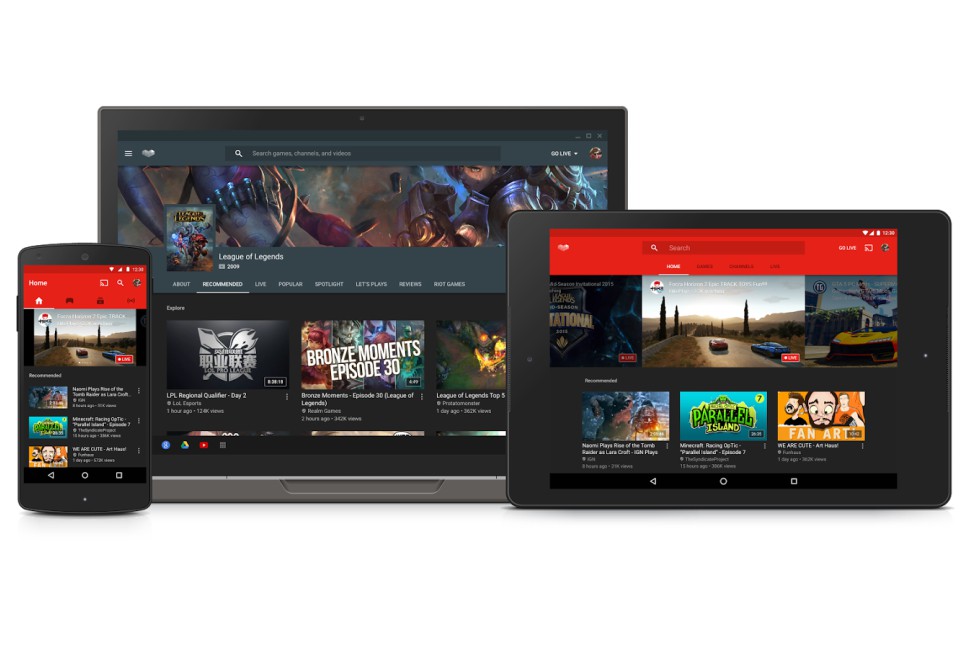
Last year Google's YouTube forayed into the live streaming space, with YouTube Gaming, a service focusing exclusively on gaming content. Initially it was launched in the U.S and UK in August 2015, and now the gaming service has launched in India, as well as Philippines and Malaysia, and is available on desktop, Android and iOS devices.
YouTube Gaming offers personalized gaming recommendations of what to watch based on the games and channels they collect. The service has more than 25,000 games pages and channels. It also has a
real time chat feature along with the ability to video archive games.
The YouTube Gaming app features a 'Games' tab and 'Channels' tab, and can browse for live streams, channels and popular games.
The app also provides live stream notification to your device. Using the Android app, you can also broadcast your gameplay to YouTube, record and live stream mobile gameplay on-the-go using Mobile Capture feature in YouTube Gaming. You can also switch between live streams of games and recorded sessions.
Google is reportedly foraying into the live-streaming market, which has seen massive growth in popularity and use in the recent months. VentureBeat reports that Google is quitely working on a new livestreaming app called YouTube Connect to take on Twitter's Periscope and Facebook's Live.
The YouTube Connect app will have the same functionality as Periscope and Facebook Live. To begin with, users will have to log-in to the app from their Google or YouTube account on their mobile, and can begin streaming immediately. The videos can be watch either from YouTube Connect app or on YouTube website in their respective channels. The app will also add the ability from users to archive previous broadcasts and watch them later.
The live video streams will supports chats, comments, tagging, and will feature a central 'news feed' that will show some of the recent live streams done by the people of whom you have subscribed on YouTube. Currently the YouTube Connect app does not support sharing functionality on social medias like twitter and Facebook, the report adds.
The report says that the YouTube Connect app will be available on Android and iOS, but a release date is not known just yet.